14 December 2023 · 9 min de lecture
What is Docker: a complete guide
Docker revolutionised software development by making containerisation simple. Xbit explains how it works, its use cases and its benefits, in plain terms.
A guide to Docker and containers
Docker is a tool for quickly building, testing and deploying software. It isolates a program inside a container environment, so code can be assembled without putting the wider application at risk. Once bugs have been tested for and fixed, developers can deploy the code safely and efficiently. Docker has revolutionised the world of software development by making containerisation simple.
This guide explains what Docker is, what it is used for, and the benefits of containerisation. It looks at how Docker is used across various software development scenarios, including microservices, continuous integration and deployment.
How does Docker work?
Docker is an open-source technology that runs on Windows, Linux and macOS. It works by isolating newly built software within its own environment. That environment takes the form of a Docker image, an executable package that defines how to create a container, which software it will use and how it will run.
After running the image, Docker creates a container holding everything needed to run an application: system tools, code libraries, all its dependencies and the runtime. The Docker image is the container's source code, and the Docker container is a running instance of that image.
Docker supports agile practices, with fast development cycles built around collaboration, flexibility and the continuous delivery of working code. It lets developers quickly run tests and make sure everything works before deploying an application to staging and production.
What is Docker used for?
Developers use Docker in many different ways thanks to its versatility for software development and deployment.
Here are some use cases for Docker
Microservices architecture
One way of answering 'What is Docker used for?' is to talk about its role in microservices.
Docker is ideal for deploying a microservices architecture, which builds a single application by breaking it down into a collection of independent, loosely coupled services.
By using Docker containers to build microservices, DevOps teams can test code without fear of negatively affecting the rest of the application. Using Docker speeds up and improves the efficiency of deploying microservices, since they can be run separately from the main codebase.
Continuous integration and continuous deployment
Developers can build continuous integration and continuous delivery (CI/CD) pipelines using Docker within DevOps. This means merging code changes into the project's main branch (continuous integration) while making sure end users always have a working application with up-to-date, reliable software, enabling continuous deployment.
Docker streamlines the CI/CD cycle, letting developers hand operations teams an application packaged as an image that runs in any environment.
Containers
Docker containers are self-contained units of code and all their dependencies that can run reliably in any environment. Docker lets users build and deploy applications with packaged content and infrastructure that your IT teams manage and secure.
Before containerisation tools existed, developers had to build their applications on local machines or virtual machines (VMs), then manually deploy them to a server environment to test and run them.
With Docker, developers can now use simple commands to build, start or stop containers and their code, simplifying and streamlining application deployment.
Software testing
Docker offers considerable flexibility and several advantages for software testing, including:
- Consistent test environments: Docker bundles everything the application needs to run in any environment or on any machine, not just the developer's own.
- Test automation: integrating Docker into existing automation simplifies repetitive tasks.
- Lower costs: with Docker, there is no more need for dedicated hardware or a VM for every test environment.
- Better collaboration: Docker makes it easy to share test environments simply by sharing container images with team members.
The benefits of Docker
The benefits of using Docker for software development and deployment include scalability, consistency, portability, isolation and resource efficiency. These benefits affect teams across the business, developers, operations and quality assurance alike.
Scalability
Docker containers start up quickly, allowing applications to be deployed seamlessly on demand. This responsiveness lets applications scale up or down as traffic fluctuates or workload increases.
For example, online shoppers can flood an e-commerce application during Black Friday sales. To handle these surges, the Docker containers running the website's microservices can scale automatically using an orchestration tool.
As the number of shoppers and transactions grows, the orchestration tool creates new containers to spread the workload, letting the website keep running smoothly despite traffic spikes.
Consistency
Docker keeps development and deployment consistent. It lets developers build and clone packages that work in any environment, and users can check the exact version of the libraries and packages needed inside a container. This minimises the risk of bugs caused by slightly different dependency versions.
Without this consistency, squashing bugs and testing code would be tedious and time-consuming, and software delivery would become unreliable given the sheer number of inconsistencies.
Containers
Docker containers are self-contained units of code and all their dependencies that can run reliably in any environment. Docker lets users build and deploy applications using packaged content and infrastructure that your IT teams manage and secure.
Before containerisation tools existed, developers had to build their applications on local machines or virtual machines (VMs), then manually deploy them to a server environment to test and run them.
With Docker, developers can now use simple commands to build, start or stop containers and their code, simplifying and streamlining application deployment.
Portability
Docker is a lightweight, portable software tool, since it packages everything an application needs to run consistently across different environments.
Because everything is self-contained, containers don't depend on any software or configuration pre-installed on the host machine, making it easy to spin up and deploy containers wherever they are needed.
Isolation
A Docker container isolates code within a self-contained environment, independent of other containers or the host machine's operating system. This isolation makes testing safer, without risking derailing the whole application, and it also eliminates compatibility issues and dependency conflicts when running applications directly across different platforms.
Resource efficiency
Compared with traditional virtualisation, Docker optimises resource use in several key areas:
- Docker containers generally use less memory and disk space than virtual machines.
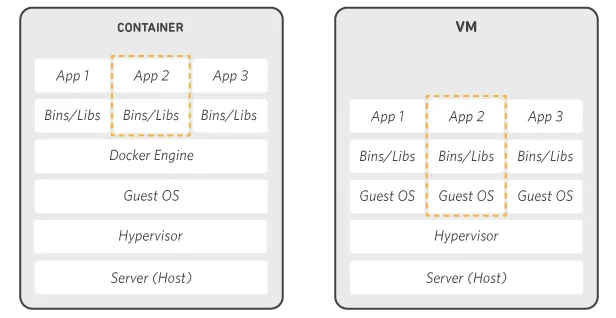
- Docker containers share the host machine's kernel, eliminating the overhead of running multiple virtual machines.
- Users can allocate specific CPU, memory and disk space to each Docker container.
- You can configure Docker orchestration tools to automatically manage the container lifecycle and optimise resource use across a cluster of machines.
Docker: frequently asked questions
What is the difference between Kubernetes and Docker?
Kubernetes and Docker often work side by side. While Docker provides an environment for running containers, Kubernetes orchestrates and manages clusters of Docker containers, making sure they run optimally. Docker is a lighter, better option if all you need is a simple container environment, and it is easier to set up for testing applications before deploying them to a production environment with many containers.
What are some common problems with Docker?
Unlike virtual machines, Docker containers don't virtualise the hardware and don't need a full guest operating system. Instead, Docker containers virtualise the operating system and run as an isolated process on the host system, making them faster and lighter than traditional VMs. Docker containers also share the host machine's resources rather than allocating resources to each individual virtual machine, making them more efficient. Use Docker when you need lightweight, portable environments for running applications; virtual machines are better suited to workloads that need a full guest operating system or a simulated hardware environment.
What are some common problems with Docker?
Common problems with Docker include resource constraints, networking complexities and issues with Docker images. It's essential to allocate and monitor resources correctly to make sure containers have enough resources to run efficiently.
What can I do with Docker?
With Docker, you can easily deploy and scale applications in any environment, confident that your code will run correctly. This is possible because Docker packages software into standardised units called containers, which bundle together everything needed to run it, including libraries, system tools, code and the runtime environment.
What is a Docker image?
A Docker image is a read-only template that defines your container. It contains the code that will be run, along with any library and dependency definitions your code needs. A Docker container is a Docker image instantiated (in other words, actually running). AWS offers Amazon Elastic Container Registry (ECR), an image registry for storing Docker images and retrieving them quickly.
What is the difference between Docker and a virtual machine?
Virtual machines virtualise the server hardware (meaning you no longer need to manage it directly), whereas containers virtualise a server's operating system. Docker is an operating system (or runtime environment) for containers: Docker Engine is installed on every server you want to run containers on, giving you a simple set of commands for building, starting or stopping containers.