5 October 2023 · 9 min de lecture
Terraform: the ultimate guide
Terraform automates cloud infrastructure provisioning through Infrastructure as Code. Xbit's complete guide to getting started, from core concepts to key commands.
A guide to Terraform and IaC (Infrastructure as Code)
In this guide, we will cover all the fundamental concepts of Terraform and how it works, along with a brief introduction to Infrastructure as Code (IaC), the Terraform lifecycle, and all the basic concepts every beginner should know.
This guide will help you get up and running with Terraform quickly.
What is Infrastructure as Code (IaC)?
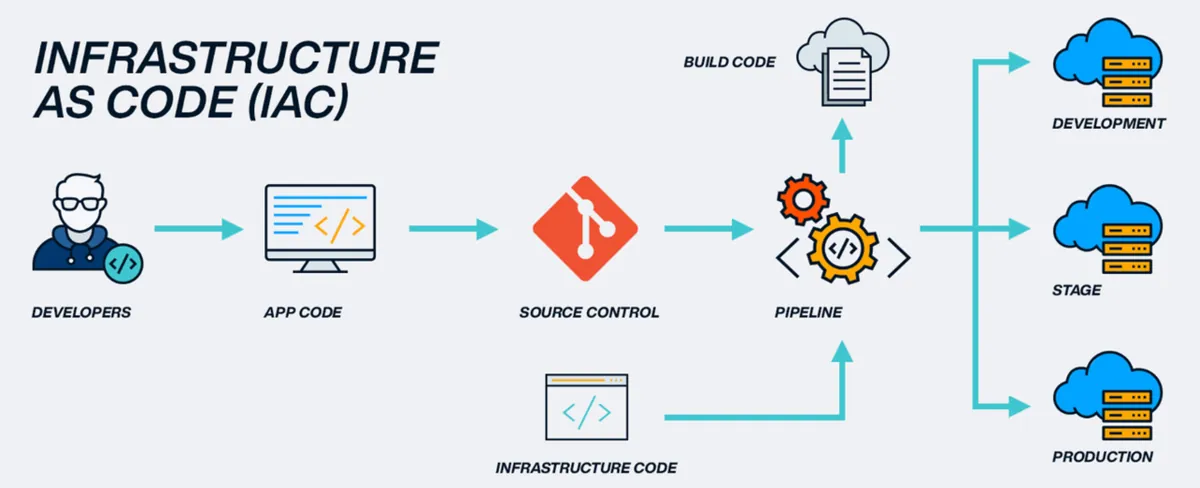
Infrastructure as Code (IaC) is a widely used term among DevOps professionals and a key DevOps practice across the industry. It refers to the process of managing and provisioning an entire IT infrastructure, both physical and virtual machines, using machine-readable definition files, helping automate the whole data centre through programming scripts.
Infrastructure as Code tools let you manage infrastructure through configuration files rather than a graphical user interface. IaC lets you build, change and manage your infrastructure safely, consistently and reproducibly, by defining resource configurations you can edit, reuse and share.
Popular IaC tools
- Terraform: an open-source, declarative tool that offers pre-written modules for building and managing infrastructure.
- Chef: a configuration-management tool that uses cookbooks and recipes to deploy the desired environment. Best suited to deploying and configuring applications using a 'pull-based' approach.
- Puppet: a popular configuration-management tool that follows a client-server model. Puppet needs agents deployed on target machines before it can start managing them.
- Ansible: used for building infrastructure as well as deploying and configuring applications on top of it. Best suited to ad hoc analysis.
- Packer: a purpose-built tool that generates VM images (not running VMs) based on the steps you provide. Best suited to building compute images.
- Vagrant: builds VMs through a workflow. Best suited to creating pre-configured development VMs in VirtualBox.
What is Terraform?
Terraform is one of the most popular Infrastructure-as-Code (IaC) tools, used by DevOps teams to automate infrastructure tasks, specifically, to automate the provisioning of your cloud resources. Terraform is an open-source, cloud-agnostic provisioning tool developed by HashiCorp and written in Go.
The advantages of Terraform
- Handles orchestration, not just configuration management
- Supports numerous providers, such as AWS, Azure, Oracle, GCP and many more
- Delivers immutable infrastructure, so configuration changes roll out smoothly
- Uses an easy-to-understand language, HCL (HashiCorp Configuration Language)
- Easily portable to any other provider
Managing any kind of infrastructure with Terraform
Terraform plugins, called providers, let Terraform interact with cloud platforms and other services through their application programming interfaces (APIs). HashiCorp and the Terraform community have written more than 1,000 providers for managing resources on Amazon Web Services (AWS), Azure, Google Cloud Platform (GCP), Kubernetes, Helm, GitHub, Splunk and Datadog, to name just a few. The Terraform Registry has providers for most of the platforms and services you already use, and if you can't find the one you are after, you can always write your own.
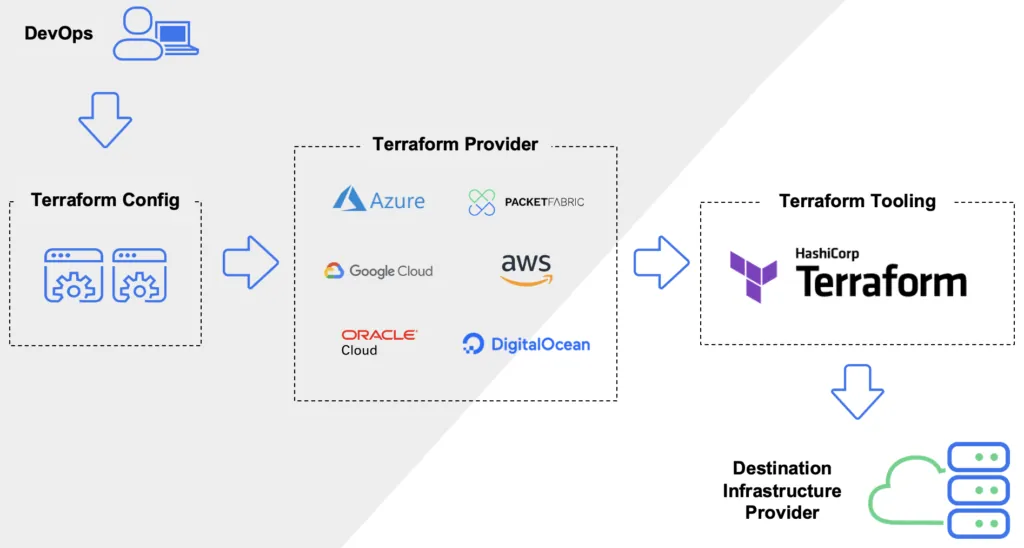
Standardise your deployment workflow
Providers define individual units of infrastructure, such as compute instances or private networks, as resources. You can combine resources from different providers into reusable Terraform configurations called modules, and manage them all through a single, consistent language and workflow.
Terraform's configuration language is declarative, meaning it describes the desired end state of your infrastructure, unlike procedural programming languages that require step-by-step instructions to carry out tasks. Terraform providers automatically work out the dependencies between resources, so they are created or destroyed in the right order.
Terraform's core concepts
The Terraform lifecycle
The Terraform lifecycle consists of the following stages: init, plan, apply and destroy.
- terraform init initialises the (local) Terraform environment. It is typically run only once per session.
- terraform plan compares Terraform's state with the current state in the cloud, then builds and displays an execution plan. This doesn't change the deployment (read-only).
- terraform apply carries out the plan. This can change the deployment.
- terraform destroy removes every resource managed by that specific Terraform environment.
Key concepts
- Variables: Terraform has input and output variables, essentially key-value pairs. Input variables act as parameters, letting you feed in values at runtime to customise your deployments. Output variables are the return values of a Terraform module that other configurations can then use.
- Provider: Terraform users provision their infrastructure on major cloud providers such as AWS, Azure, OCI and others. A provider is a plugin that interacts with the various APIs needed to create, update and delete different resources.
- Module: any set of Terraform configuration files in a folder is a module. Every Terraform configuration has at least one module, known as the root module.
- State: Terraform records information about the infrastructure it creates in a Terraform state file. Thanks to this state file, Terraform can find the resources it previously created, which it is meant to manage, and update them accordingly.
- Resources: cloud providers offer a range of services, referred to as resources in Terraform. Terraform resources can be compute instances, virtual networks, or higher-level components such as DNS records. Each resource has its own attributes that define it.
- Data source: a data source performs a read-only operation. It lets you fetch or compute data from resources or entities that aren't defined or managed by Terraform, or by the current Terraform configuration.
- Plan: one of the stages of the Terraform lifecycle, where Terraform works out what needs to be created, updated or destroyed to move the infrastructure from its current state to the desired state.
- Apply: one of the stages of the Terraform lifecycle, where the changes needed to move the infrastructure from its current state to the desired state are actually applied.
Terraform configuration
Terraform providers
A provider is responsible for understanding API interactions and exposing resources. It is an executable plugin containing the code needed to interact with the service's API. Terraform configurations must declare the providers they need so that Terraform can install and use them.
Terraform has more than a hundred providers for different technologies, and each one gives Terraform users access to its resources. Through the AWS provider, for example, you get access to hundreds of AWS resources, such as EC2 instances, AWS users, and so on.
Terraform configuration files
Configuration files are a set of files used to describe infrastructure in Terraform, with the extensions .tf and .tf.json. Terraform uses a declarative model to define infrastructure, and configuration files let you write a configuration that declares the desired state. They are made up of resources with parameters and values representing the desired state of your infrastructure.
A Terraform configuration is made up of one or more files in a directory, provider binaries, plan files, and state files once Terraform has run the configuration.
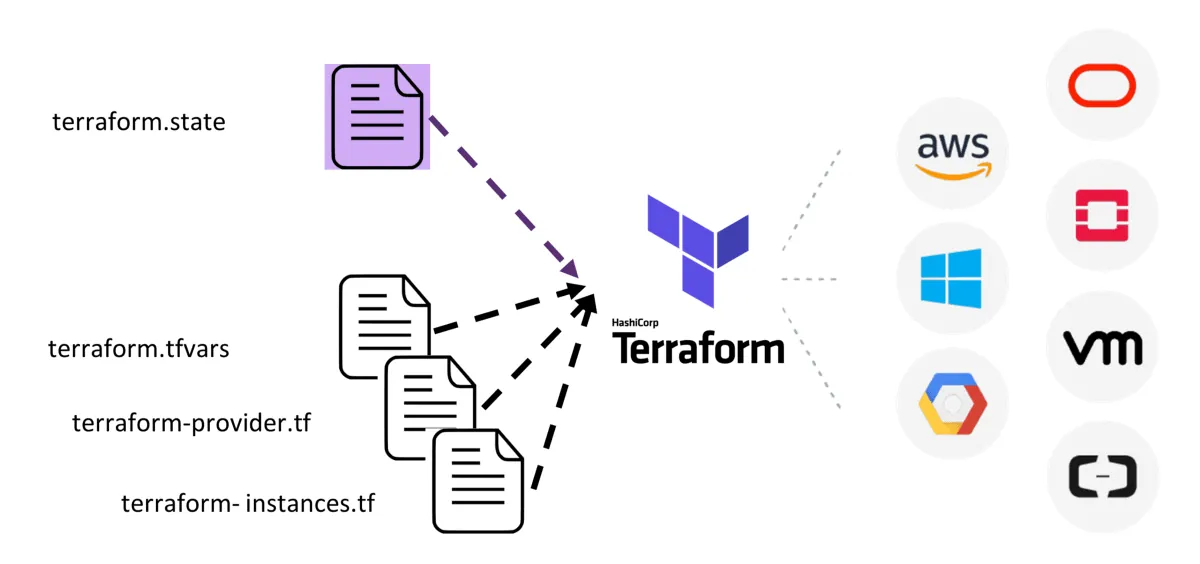
- Configuration file (*.tf files): this is where we declare the provider and the resources to deploy, along with the resource type and any resource-specific parameters.
- Variable declaration file (variables.tf or variables.tf.json): declares the input variables needed to provision resources.
- Variable definition files (terraform.tfvars): this is where we assign values to the input variables.
- State file (terraform.tfstate): a state file is created once Terraform has run. It stores the state of our managed infrastructure.
Getting started with Terraform
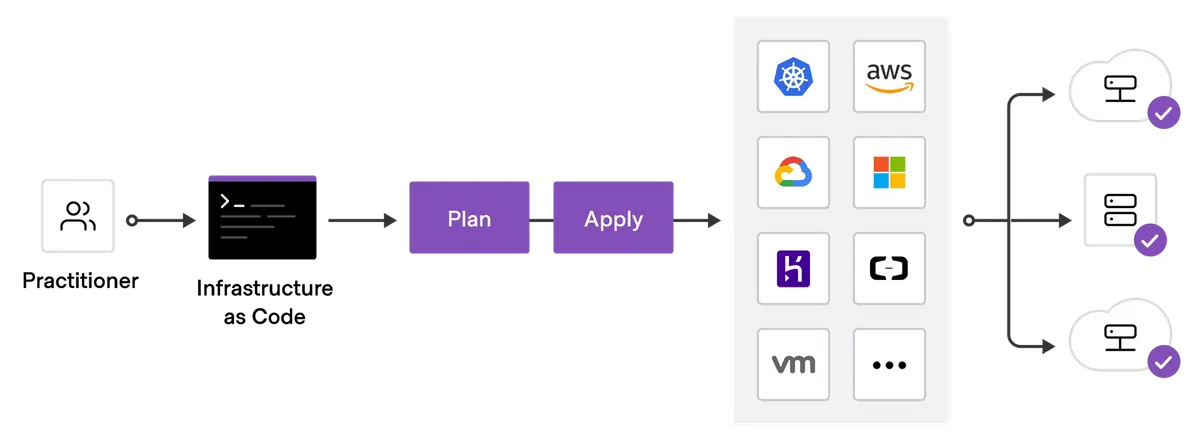
To start building infrastructure resources with Terraform, there are a few things to keep in mind. The general steps for deploying one or more resources in the cloud are as follows:
- Set up a cloud account with any cloud provider (AWS, Azure, OCI, Xbit)
- Install Terraform
- Add a provider, AWS, Azure, OCI, GCP or others
- Write the configuration files
- Initialise the Terraform providers
- PLAN (dry run) using terraform plan
- APPLY (create a resource) using terraform apply
- DESTROY (delete a resource) using terraform destroy
Terraform: frequently asked questions
Do I need prior programming or infrastructure experience to follow this guide?
No, you don't need any prior programming or infrastructure experience to follow this guide. It is designed for beginners and assumes no prior knowledge of Terraform. The guide provides step-by-step explanations and examples to help newcomers understand and apply the concepts effectively.
Are there any prerequisites for using Terraform?
The guide may mention a few prerequisites, such as a basic understanding of cloud computing concepts and having an account with a cloud provider (if you are planning to provision resources in the cloud). It may also recommend installing Terraform and a text editor suited to writing code.
Does the guide provide practical examples and exercises?
Yes, the Terraform beginner's guide generally includes practical examples and exercises throughout. These help reinforce the concepts and let readers practise writing Terraform configurations, running commands and managing infrastructure resources.
How does Infrastructure as Code handle infrastructure updates and changes?
Infrastructure as Code tools generally handle updates and changes by comparing the desired state defined in the code with the infrastructure's current state. When changes are made to the code, the tools generate an execution plan describing what needs to change to reach the desired state. This plan can then be reviewed and applied to update or modify the infrastructure accordingly.
Can I use Infrastructure as Code for existing infrastructure?
Yes, Infrastructure as Code can be used with existing infrastructure. By defining your existing infrastructure in code, you can capture its current state and make changes to it through code-based configuration files. This approach lets you manage existing infrastructure in a consistent, automated way.